The universal tabletop toolkit · for Windows

Your rulebook goes in. A working game comes out.

RPGadget reads the book you already own, turns it into a playable realm, and gives you one place to build the world, draw the maps, seat the players, and run the night. Any system. In person or across the country. Bought once.

Built GM-first Any system, not one Table & remote play One-time purchase
Actual in-app scene
The front door

Every game you own, standing on one shelf.

This is how RPGadget opens: not a file menu, a shelf. Each rulebook you import becomes a bound realm standing beside the others — fantasy tomes next to sci-fi slates next to your own homebrew. Take one down and the whole application dresses itself in that world.

  • Realms declare what they are — the shelf renders a tome, a datapad, a ledger, a case file
  • Progress at a glance: bound, in progress, hand-authored
  • An empty slot is always waiting for the next book
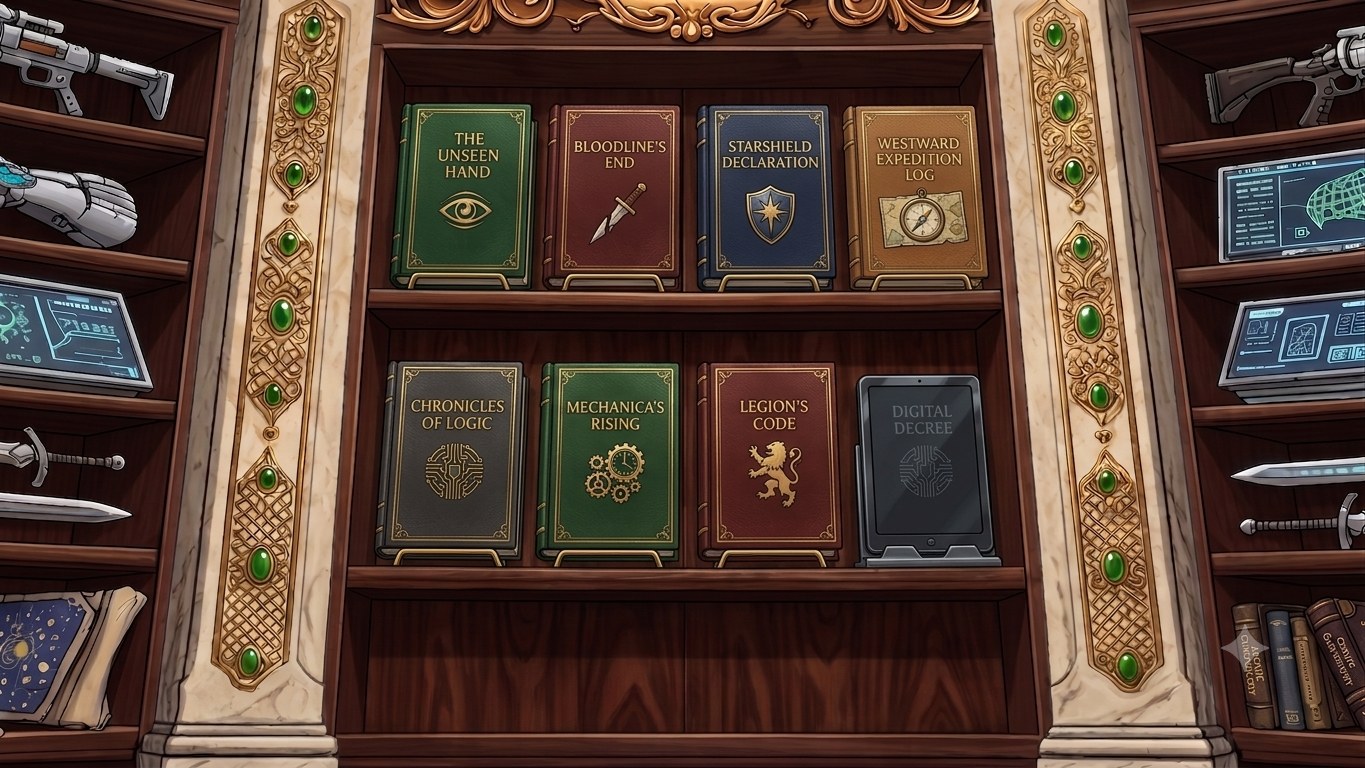
The realm shelf inside RPGadget — imported rulebooks standing as bound volumes between marble pillars
Actual screenshot The realm shelf — the application's front door
Fantasy
Heist
Sci-fi
Horror
Homebrew
Cyberpunk
Steampunk
Post-apoc
Supers
Noir
Your next game

Realm vessels — every genre declares its own physical form: tome, ledger, datapad, case file, salvage binder. The shelf renders whatever the realm says it is.
The problem

Running a great campaign shouldn't take five products and a spreadsheet.

Maps in one app. Notes in another. Character sheets in a third. Rules in a browser tab, dice in a chat bot, and the actual story in a notebook you can't find on Thursday.

Every one of those tools makes you type the same campaign in again.

  • Prep spread across tabs that don't know about each other
  • The same NPC entered in four places, wrong in three
  • Thin or missing support for the system your table actually wants to try
  • Subscriptions stacking up for tools you use twice a month
  • Your campaign held hostage on somebody else's server
The whole workflow

From the book on your shelf to the last die of the night.

Every screen below is the real application. No mockups, no renders — this is the software as it runs today.

Chapter I

Bring in the book you already own

Point RPGadget at a PDF of your rulebook. It doesn't just scrape the words — it reads the page the way you do. A red cell is a warning. A column position is a tier. A line between two boxes is a relationship. Four channels of meaning, read at once, on your own PC.

You review what it found, fix what it got wrong, and the book becomes a realm: rules, conditions, gear, adversaries, tables and lore, all queryable and all yours. Nothing is uploaded. Nothing is shipped with the app — your content comes from your book.

Channel 01 · Words

The text itself

Every tool reads this. Alone, it isn't enough — the page carries more meaning than its sentences.

Channel 02 · Color & position

Layout is data

Red means danger. Which row, which column, which tier — where a thing sits is information.

Channel 03 · Connections

Topology is meaning

Lines, arrows and brackets tie the page together — and most software is blind to them.

Chapter II

The book becomes a realm you can open

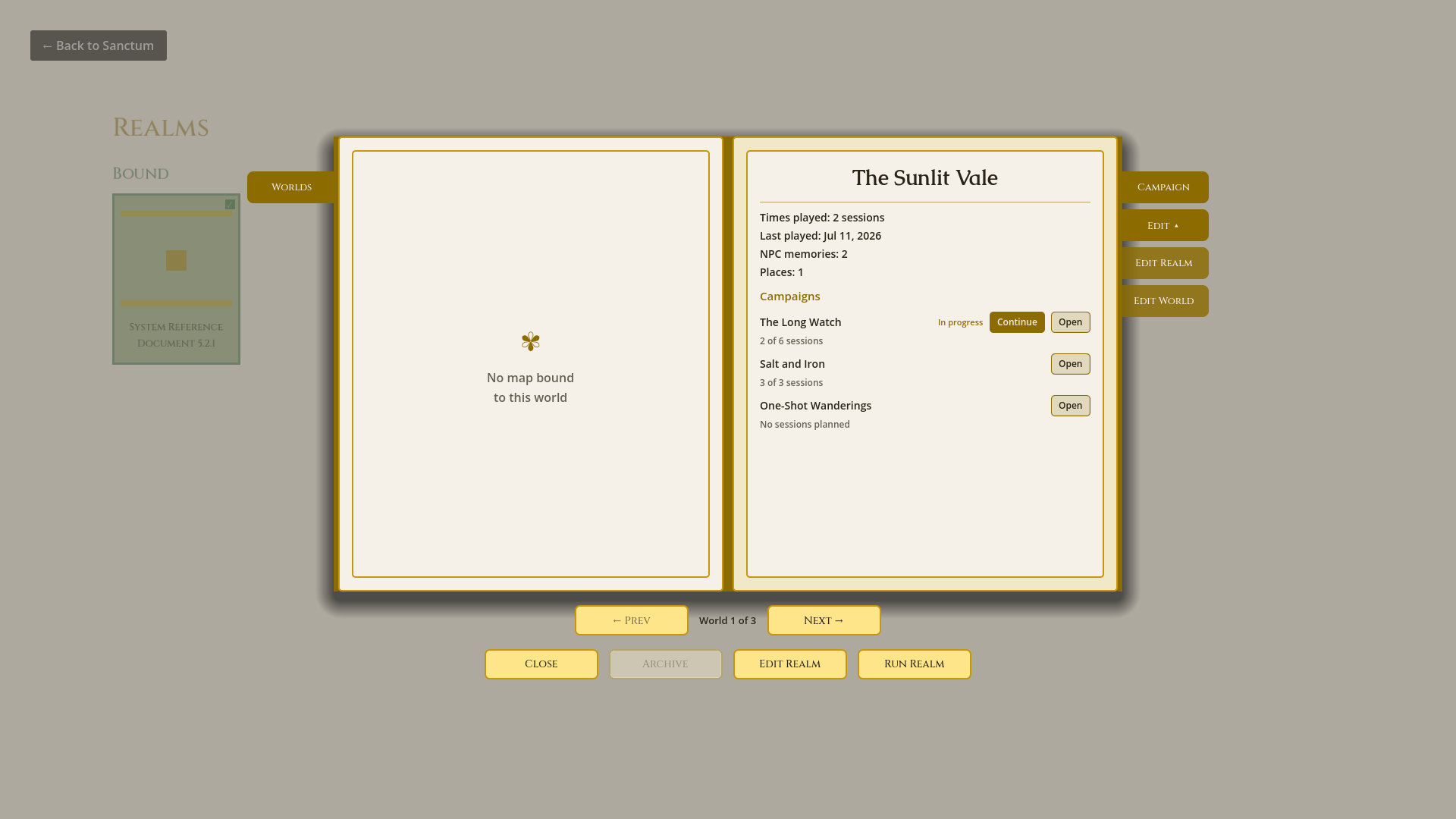
A realm is the whole game in one object: its rules, its dice, its conditions, its gear, its bestiary, its character options, its tone and its palette. RPGadget's engines know none of it by name — realms declare, engines render. That's why the next system you try doesn't need a new app.

The Realm Book — a realm open as a two-page spread showing its worlds and campaigns
Actual screenshot The Realm Book — worlds and campaigns as an open spread
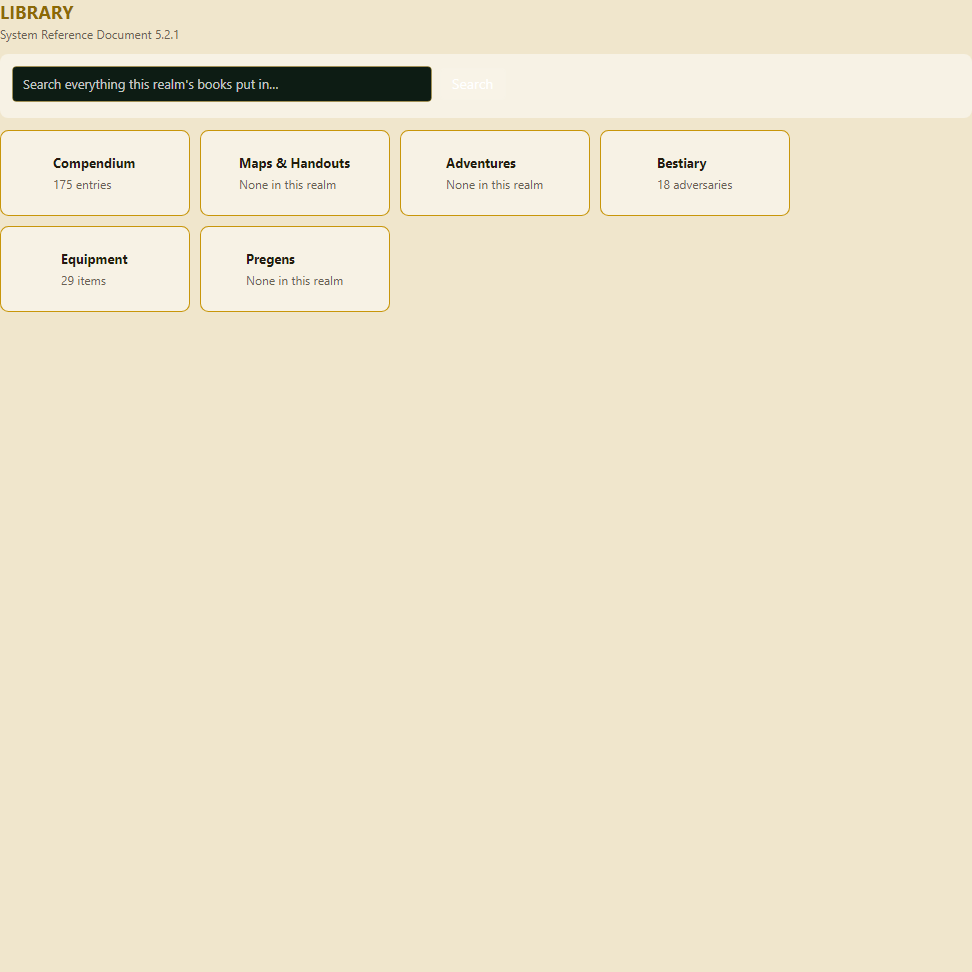
The Library — the imported rulebook made browsable and queryable
Actual screenshot The Library — your book, queryable
Chapter III

Build a world that remembers

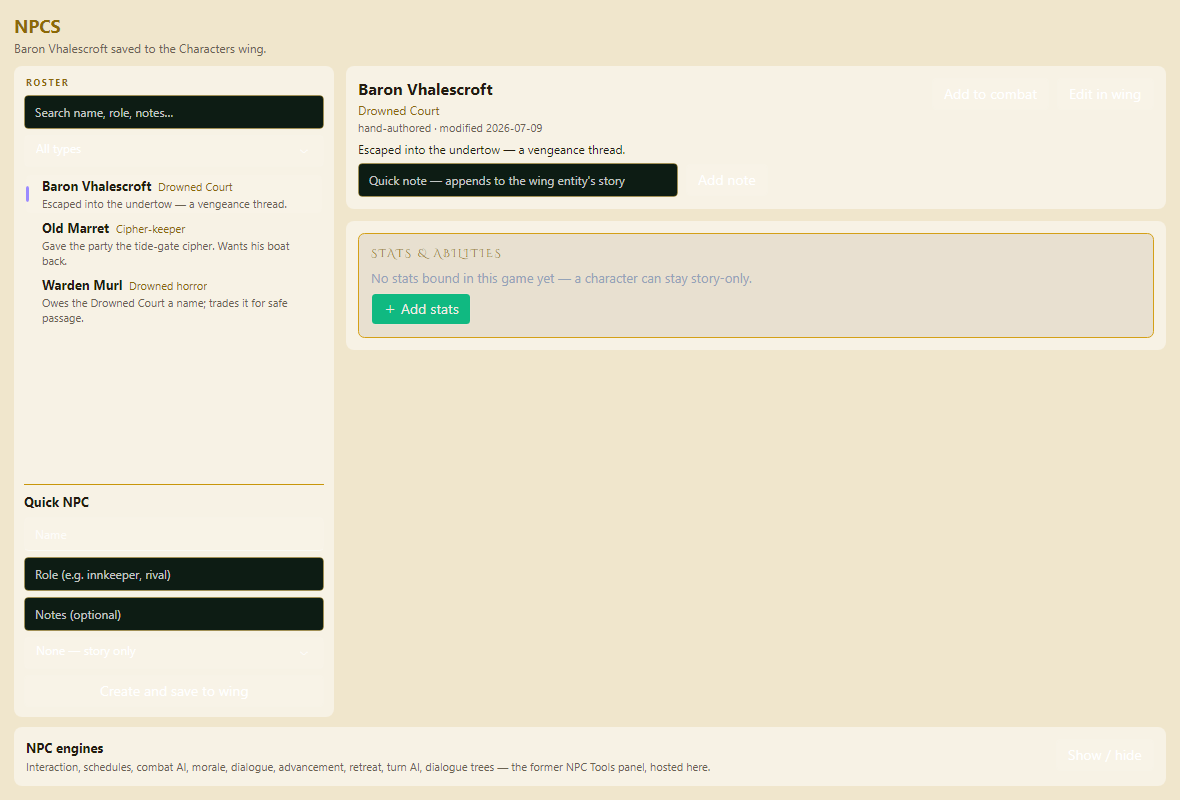
Worlds are permanent; campaigns live inside them. The barkeep your last group tipped is still behind the bar when the new group walks in — older, and with opinions about what happened. People, places, factions, history, economy, myth and rumour each have a wing, and every entry can point at every other.

The Atlas People wing — NPCs with relationships, memories and campaign history
Actual screenshot The Atlas — the People wing, with cross-linked memory
Chapter IV

Plot the story without railroading it

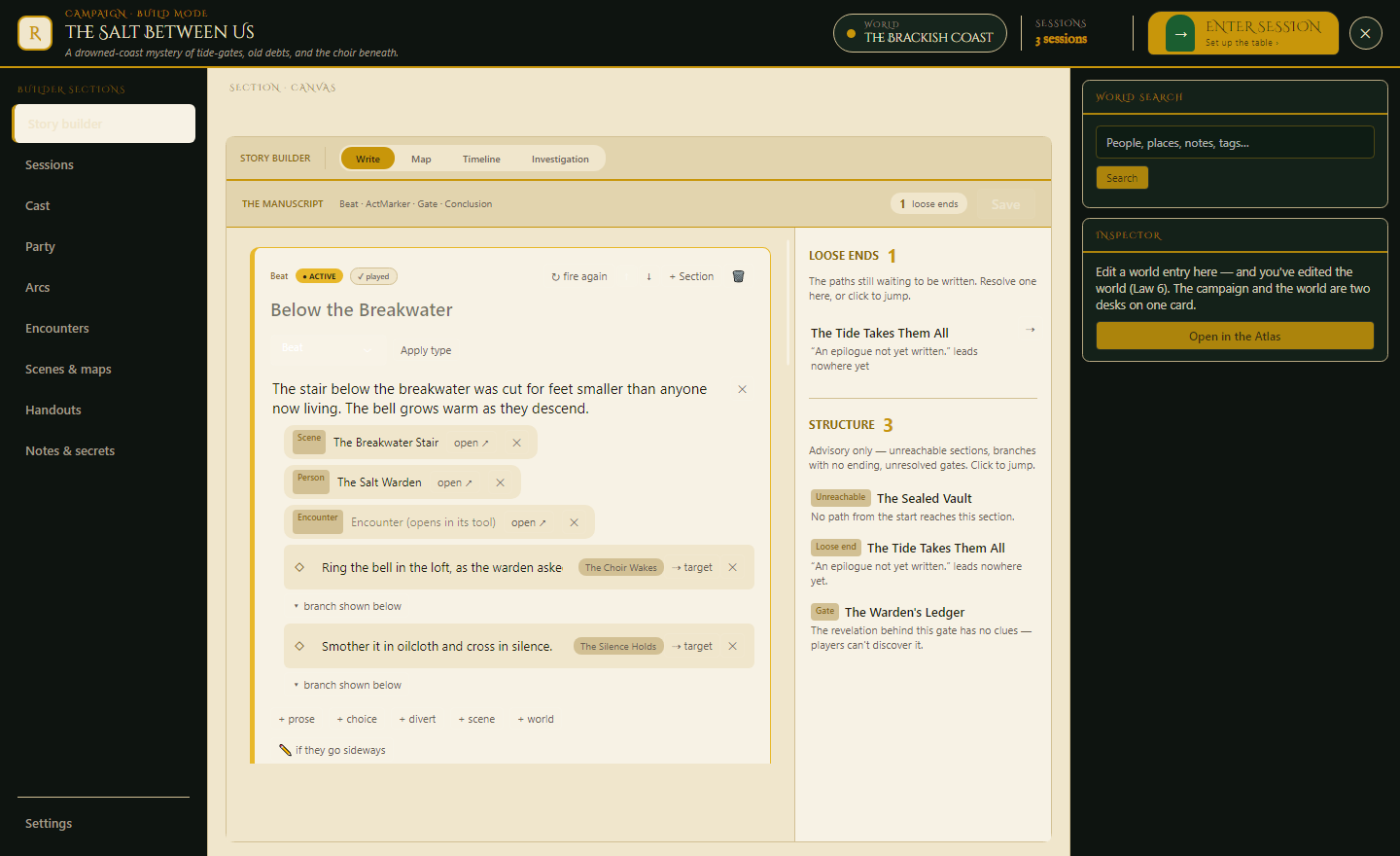
Lay out beats, branches, clocks and consequences on a board you can actually read at a glance. Every beat can hang an NPC, a place, a map, an encounter or a handout off it — so when the party turns left, the left-hand branch already has its people attached. Improvise anything; the board records what actually happened and carries it into the world's memory.

The Campaign Builder — writing beats with attached scenes, people and encounters, with structure advice on the right
Actual screenshot Campaign Builder — beats, branches and loose ends
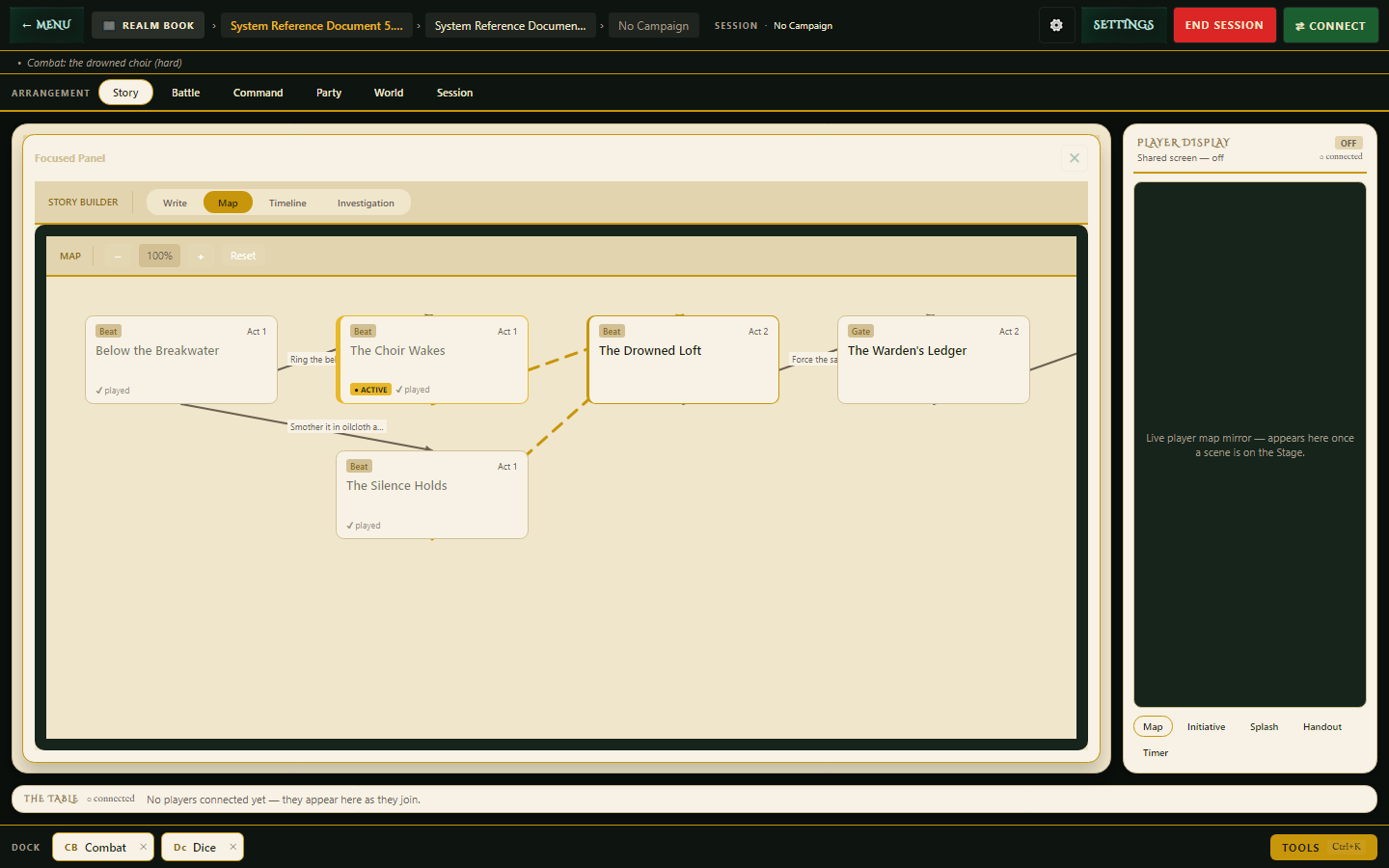
The story map — beats and gates connected across acts, live during a session
Actual screenshot The story map, live in session
Chapter V

Maps, scenes and handouts at the table

Draw maps yourself with real tools or generate a starting point and take it apart, then run them at the table with fog of war, tokens and a player view that shows only what you've revealed. Scenes, maps and handouts stage from the same place — push any of them to the second screen or to every player's browser the moment you want them seen.

Maps and handouts staged for the table
Actual screenshot Scenes, maps & handouts — staged and ready to reveal
Manual first

Real drawing tools

Brushes, shapes, walls, doors, stamps and freehand. Generators are a starting point you can always overrule — never a black box.

Every scale

World to storeroom

World, region, settlement, site and tactical tiers — plus space tiers — with places on one tier opening into the tier below.

Table-ready

Player display

A second screen or TV showing exactly what the party can see, and nothing they can't.

Chapter VI

Run the night from one screen

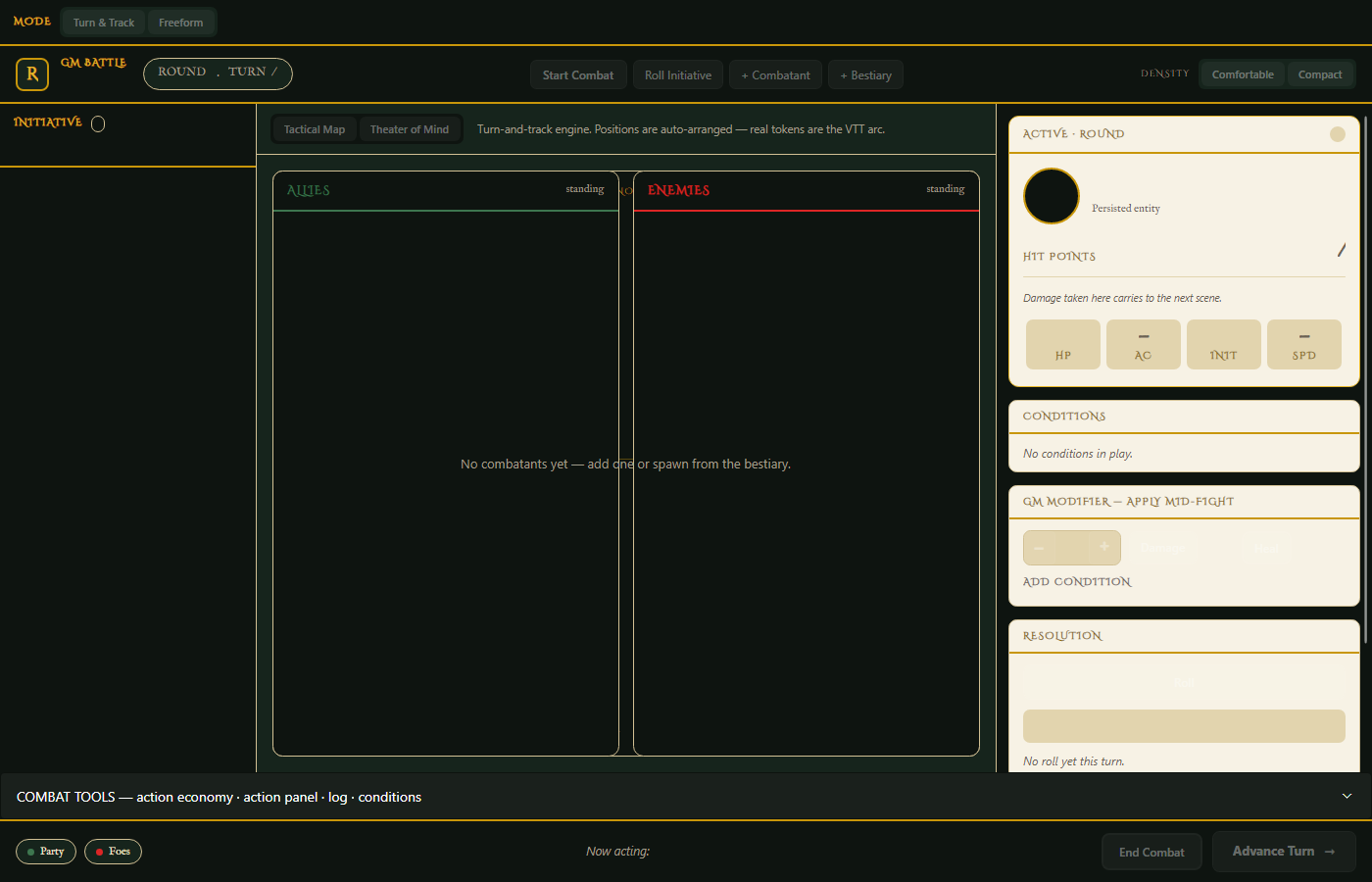
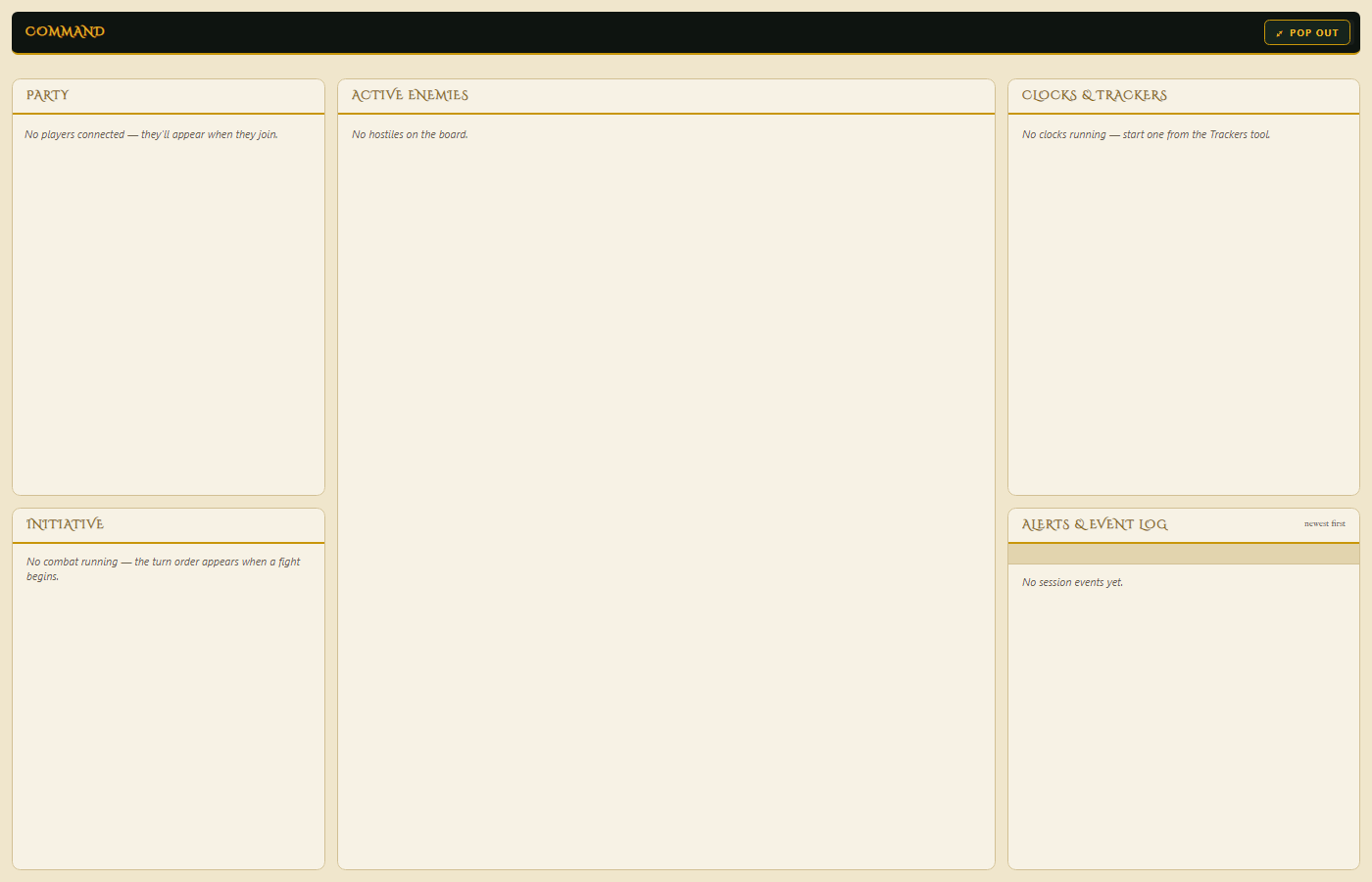
Session isn't a tab you open — it's a mode you enter. One workspace rearranges itself for what you're doing: command centre, battle, story, dice, trackers, journal. Press Ctrl+K to summon anything in the campaign by name. Nothing you prepared is more than a keystroke away.

Session mode, Battle preset — initiative, combatant detail, conditions and resolution
Actual screenshot Session mode — the Battle preset
Session mode, Command preset — party, enemies, clocks, initiative and the event log
Actual screenshot The Command centre preset
Chapter VII

The Realm Crafter — where books become realms

Click the pedestal in the Sanctum and the Crafter rises out of it — a workbench of emerald light with the hall still visible through it. Twelve source slots that know what each book is. An extraction that shows its work in three bins, where nothing from your book is ever silently lost. A rules table that marks what came from the page and what came from you. And at the end, a binding: your realm descends to the shelf as a finished book.

The Crafter is in active design right now. These aren't screenshots — they're the live design concepts, and you can walk around inside each one:

Concept — in development  Design targets for the build, shown as-is.

Chapter VIII

Seat your players — in the room and across the country

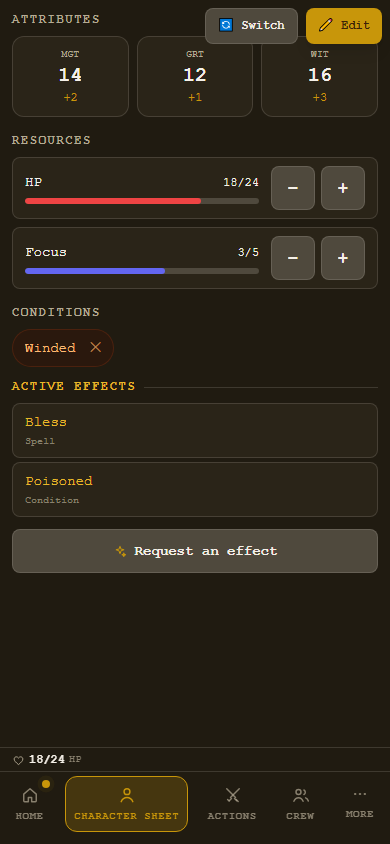
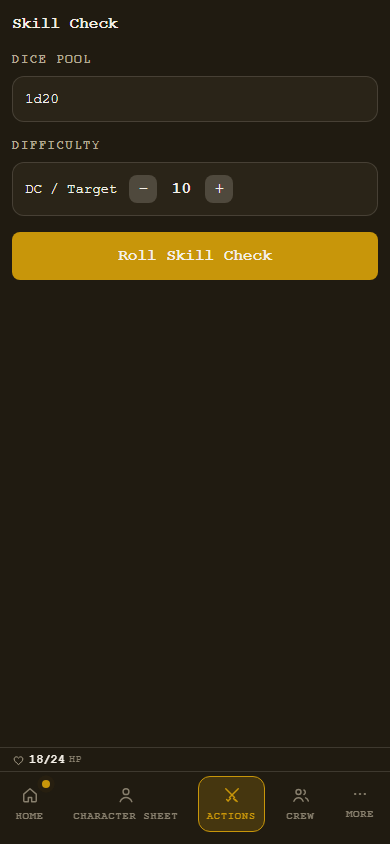
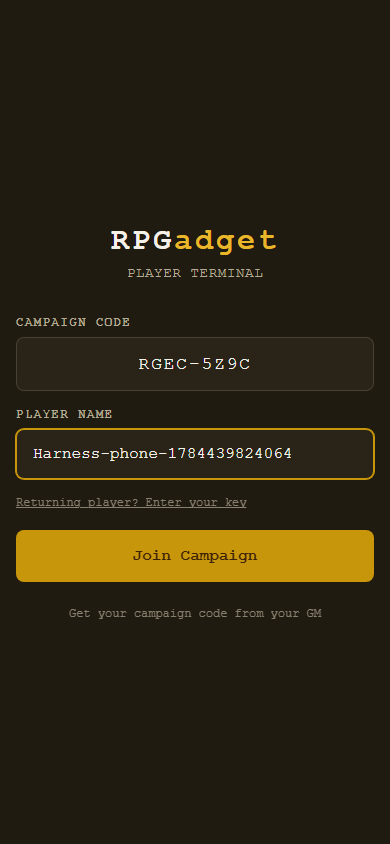
Players never install anything. They open a link on the phone already in their hand and they're in. The person on your sofa joins over your wifi with no internet at all; the friend who moved joins over the relay — including building their character days before the session, so game night starts with play instead of paperwork.

Their screen wears the realm's declared theme — the terminal look below belongs to this particular game, not to the app.

A player's character sheet on their phone, in the realm's own theme
Character sheet · actual player screen
A player taking an action from their phone
Taking an action · actual player screen
Joining the table from a phone — no install
Joining · actual player screen
Plane one

At the table, on your own wifi

Everyone's phone talks straight to your PC. No internet, no account, no server between you and your friends. The router in the corner is the whole infrastructure.

Plane two

Remote, over the relay

Players anywhere join the same session over the internet, including pre-session character creation — proven live, phone to PC, across the country.

Realms declare, engines render

Change games, and the whole app changes its face.

Every realm declares a theme — palette, type, texture, mood — and the GM shell and player screens both wear it. Nine genre themes ship today. This isn't a skin pack sold per title; it's how the engine works. Click a realm:

RPGadget — The Verdant Compact
Character
Party
Rules
Maps
Journal

Elowen of the Greenway

Warden · Circle of the Deep Root
Vigour
17
Grace
14
Wisdom
16
Oath
III
Take an action Consult the rules Whisper the GM

The neutral marble-and-gold gives way to whatever the realm declares — same engine, same renderers, different world.

What else is in the box

The rest of the toolkit

Dice & resolution

d20, dice pools, narrative symbol dice, degrees of success. The realm declares how rolling works; the app rolls it.

Conflict engines

Turn-and-track combat and freeform action-consequence play — the shapes that cover most of the hobby.

Character creation

Guided creation driven by the realm's own options — for you, or for players remotely before the session.

NPC workshop

Build them by hand or draft them fast — with a memory of every table they've met.

Encounter building

Assemble adversaries, hazards and objectives, then drop the whole thing into a beat.

Loot & economy

Treasure, trade and wealth — handed to players directly: whispers, loot drops, trades and targeted effects, all live.

Trackers & clocks

Progress clocks, countdowns, initiative, conditions and anything else you need to remember mid-fight.

Journal & recap

Session logs built from what actually happened, ready to read back next week.

Handouts

Letters, maps and secrets — pushed to one player, some players, or the whole table.

Calendar & downtime

Custom calendars, travel, seasons, and downtime that advances the world while the party rests.

Safety tools

Session zero, lines and veils, and a private way for anyone to pump the brakes.

Summon anything

Ctrl+K, type a name, get the NPC, rule, map, item or scene. The feature you'll use most.

Why it stands out

More than a VTT. More than a planner. More than another subscription.

Typical VTTNotes appSingle-system toolRPGadget
Works across systemsA few, unevenlyNo rules at allOne, by designAny — systems are data
Brings in your own bookManual entryCopy and pasteLicensed content onlyReads your PDF, structure and all
Prep and play in one placePlay onlyPrep onlyPartialOne continuous workflow
Persistent world memoryPer-campaignWhatever you typeRareWorlds outlive campaigns
In-person table supportBuilt for remoten/aVariesSame-wifi play with no internet
Where your data livesTheir serversTheir serversTheir serversYour drive
Cost shapeMonthly, often per seatMonthlyMonthly or per bookOne purchase
Where it is and where it's going

Built in the open, in the order a GM would want it.

RPGadget is in active development ahead of a first release. An honest split of what already runs, what's being finished now, and what's next.

Running today
  • Realms as dataFour reference realms across four rules shapes, proven end to end.
  • The shelf & the libraryImported books stand on the shelf and open into a browsable game.
  • World builderNine wings of world content with cross-links and persistent memory.
  • Story builderBeats, branches, clocks and consequence recording.
  • Session modeThe live workspace with presets, initiative, dice and the player rail.
  • MultiplayerWifi and remote join live; whispers, loot, trade and targeted effects all working.
In the workshop
  • Whole-book importCapturing an entire rulebook end to end, not just its shape.
  • Player action surfaceOne renderer for every system's way of taking an action.
  • Character creation, player sideFull guided creation from the realm's catalogue.
  • Onboarding & installerThe first-run path, centred on importing your first book.
  • Private betaA small trusted table first, then wider.
Next
  • Map scale-tier redesignTravel and exploration across world, region and site tiers.
  • Deeper VTT combatElevation and richer tactical tooling.
  • Immersion layerAmbient sound, cued reveals, richer presentation.
  • Themed packsOptional genre expansions for GMs who want them.
  • Hardware-aware assistanceBigger local models on machines that can carry them.
Concept art for the Realm Crafter — the workbench where imported books are shaped into playable realms
Concept art — in development The Realm Crafter, from the workshop
Pricing

Premium toolkit. One-time purchase.

A serious long-term investment in the hobby, not another monthly drain.

Buy onceLaunch price announced at release
  • The full GM toolkit — import, world, story, maps, session, players
  • Unlimited realms, worlds, campaigns and players
  • In-person and remote play, no per-seat charge
  • Your data on your PC, forever
  • Optional themed packs available separately
Built for Windows 10 & 11 · 64-bit
Questions

Fair things to ask

Is this only for one game system?

No. Systems are expressed as data, so RPGadget supports many published games and homebrew alike. If your table changes games next year, your toolkit doesn't become obsolete.

Is it just another virtual tabletop?

The VTT is one chapter of many. RPGadget also covers importing your book, world building, story planning, NPCs, encounters, player support and live session management — connected, not bolted together.

What does it run on?

RPGadget is a native Windows application for Windows 10 and 11. Players don't need Windows — they join from any browser on any phone, tablet or computer.

Does it come with rulebook content?

No, and that's deliberate. The app ships with no publisher's text inside it. Your library is built from the book you own and import, or from what you author yourself.

Do my players need to buy or install anything?

No. Players open a link on a phone, tablet or laptop. No player app, no player licence, no per-seat fee.

Does it work without internet?

A session at your own table runs entirely on your local wifi, with no internet at all. The internet is only needed when someone joins from somewhere else — or builds a character remotely before you sit down.

Will it replace my judgement as a GM?

No. Every feature is a complete manual tool first; assistance sits on top and is always optional and always editable. You stay the author.

Why buy this instead of stacking smaller tools?

Because the tools stop duplicating each other. One world feeds the story, the story feeds the session, the session feeds the journal, and none of it needs typing in twice.

One home for every campaign

Your campaign deserves better than a patchwork workflow.

Bring your book in. Build the world. Seat the table. Run the night.

Launch news, screenshots and beta invitations. Nothing else.